
Explore your data. Find your answers. Share your results.
Resolve makes it easy to import, analyse and explore survey data without needing specialist scripting knowledge.
From answering a simple question to undertaking more extensive analysis, Resolve puts powerful crosstabs and charting capabilities at your fingertips.
From Data to Answers
Getting from survey data to useful results doesn’t need to be complicated.
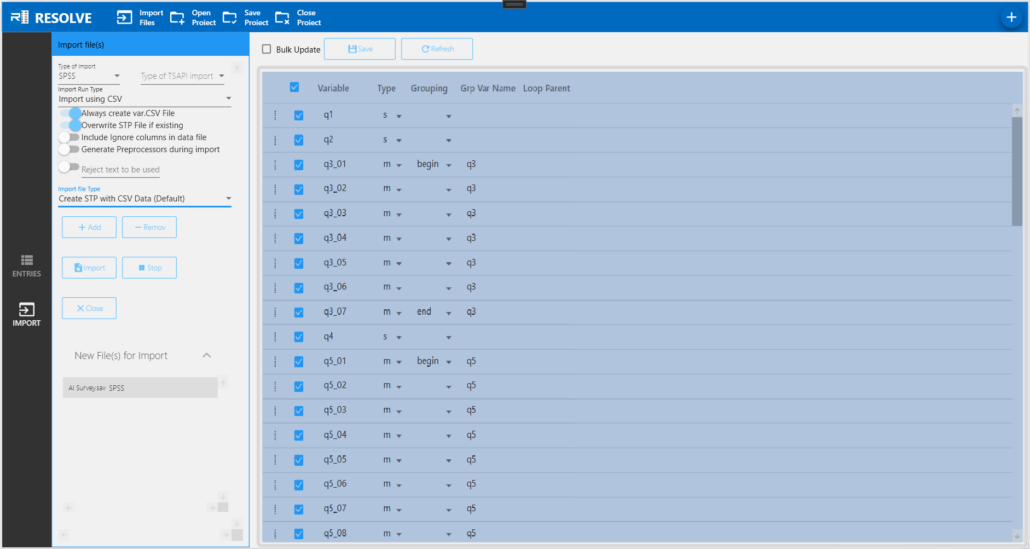
1. Import your data
Bring SPSS, Triple-S or TSAPI data into Resolve using MRDCL’s Intelligent Import facility.
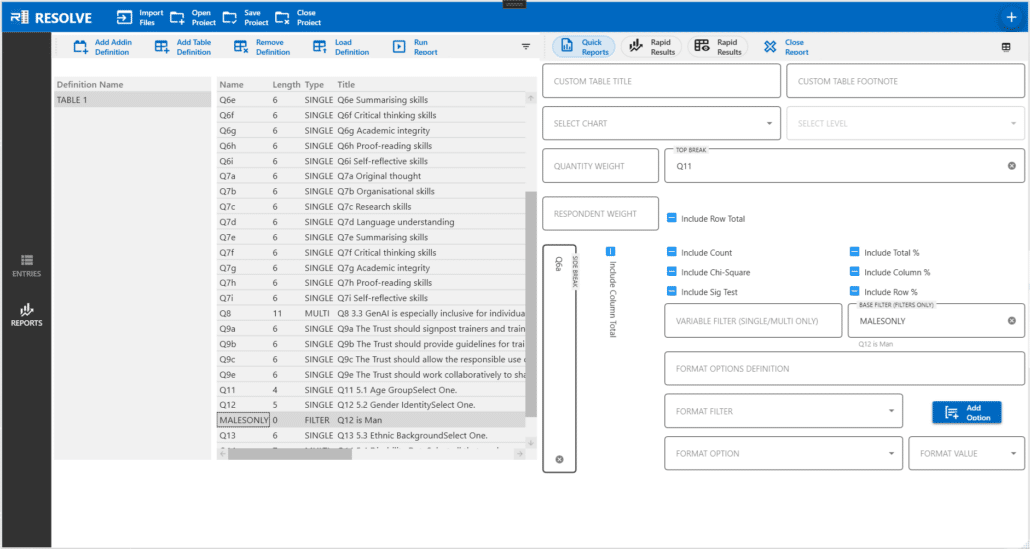
2. Specify your crosstabs
Choose the variables and analysis you need through Resolve’s interface, without writing scripts.
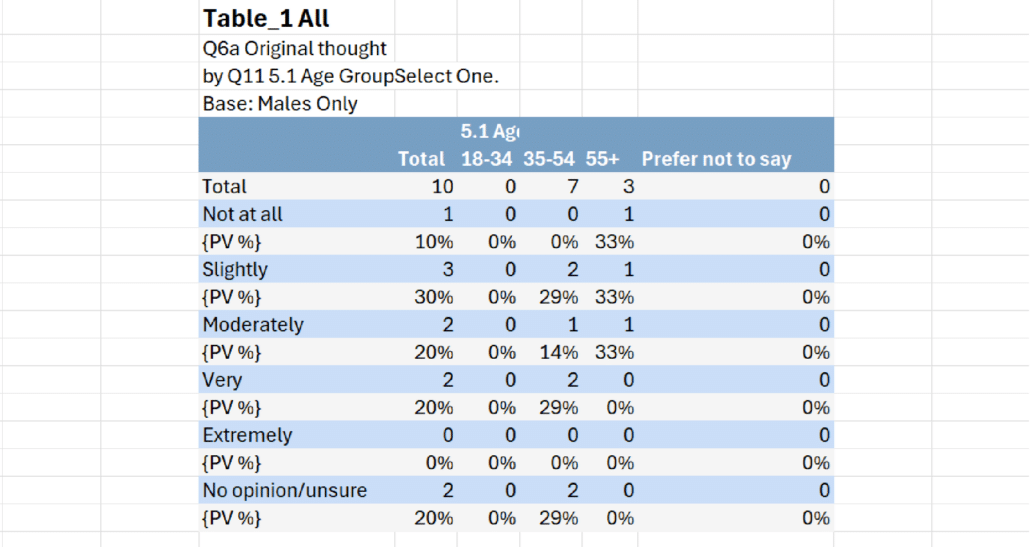
3.Explore your tables
Generate and examine the results, including detailed crosstab analysis.
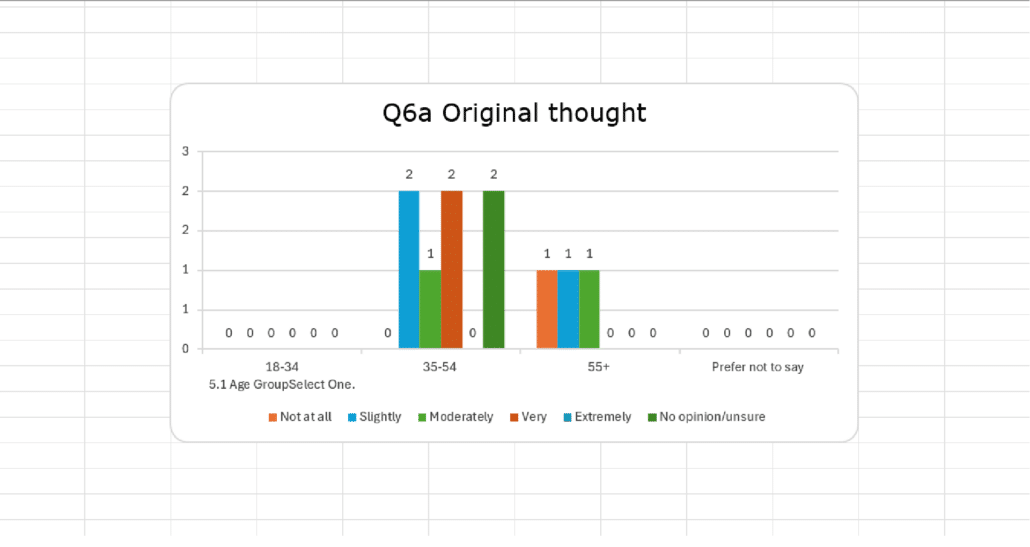
4. View your charts
Present results visually to help identify patterns and communicate findings.
Need to Go Further?
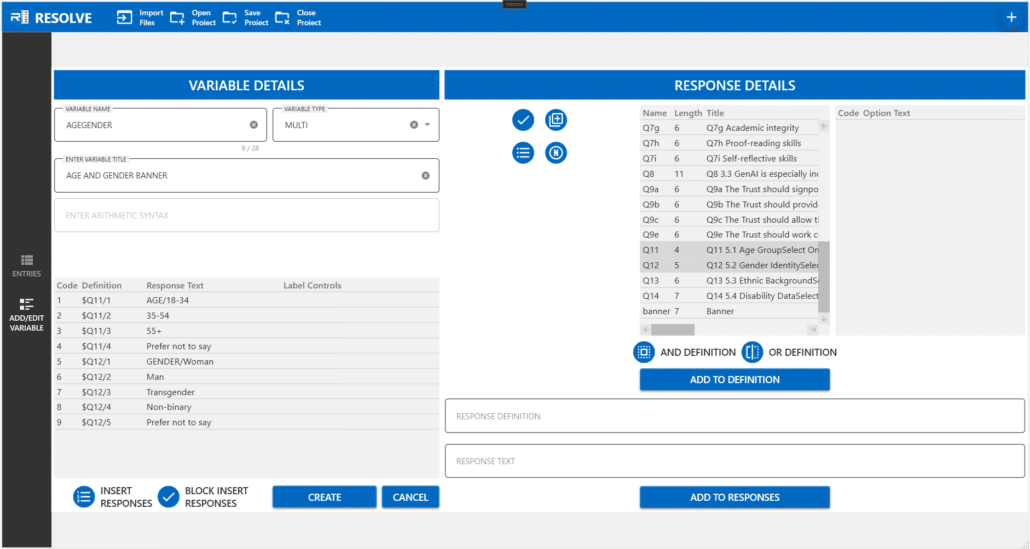
5. Create your own variables.
Go beyond the variables supplied with your data. Resolve allows you to define
new variables to support more demanding analysis
Share Your Data. Let Others Explore.
Research doesn’t always end when the tables have been produced. Colleagues and clients may want to examine particular findings, ask further questions or use the results in their own reports.
Resolve gives you two ways to share your work.
Export tables and charts for use in reports, presentations or other applications, without requiring recipients to use Resolve.
Resolve’s built-in sharing tool packages the necessary files into a ZIP file that can be sent by email or made available through a shared file location. Recipients with their own copy of Resolve can open the project, explore the data and produce additional analysis.
Share the results, or give others the freedom to explore further.
Go Further with Plugins
Plugins allow you to simplify complex or repetitive analysis through forms that generate the necessary
instructions behind the scenes.
Use plugins supplied with Resolve or create your own to suit particular analytical requirements. Once
configured, they provide a straightforward way to repeat demanding tasks without having to build the analysis
from scratch each time.




Choose Your Resolve Edition
Three editions. The same powerful analytical foundation.
Every edition includes full Intelligent Import capabilities, extensive variable handling and crosstab analysis. The
differences are in project size, tables per run and plugin availability.
|
Resolve Lite
|
Resolve Pro
|
Resolve Studio |
|
|---|---|---|---|
|
Price |
Free |
Paid |
Paid |
|
Records per project |
200 |
2,000 |
Unlimited |
|
Tables per run |
2 |
Unlimited |
Unlimited |
|
Active plugins |
None |
2 |
Unlimited |
|
Projects |
Unlimited |
Unlimited |
Unlimited |
|
Intelligent Import |
Full |
Full |
Full |
|
Variable generation |
Included |
Included |
Included |
|
Crosstab facilities |
Full |
Full |
Full |
A free, fully functioning analytical tool for small datasets and occasional queries. Create unlimited projects and run as many batches of two tables as you need.
Generate larger sets of tables, work with up to 2,000 records per project
and use up to two active plugins.
Remove the record limit and use as many plugins as your projects require.
Try Resolve before you decide
Resolve Lite offers a free, practical way to explore the analytical capabilities of Resolve with your own data before choosing Pro or Studio. Its limitations are on data volume, tables per run and plugin availability – not the underlying analytical engine.
Calculate Your Resolve Licence Cost
Select your edition and the number of licences required.
Pricing will be available once licence rates are confirmed.
Ready to Explore Resolve?
Whether you want quick answers from survey data, greater analytical flexibility or a way to share projects with
colleagues and clients, there's a Resolve edition to suit your needs.